
Cosy
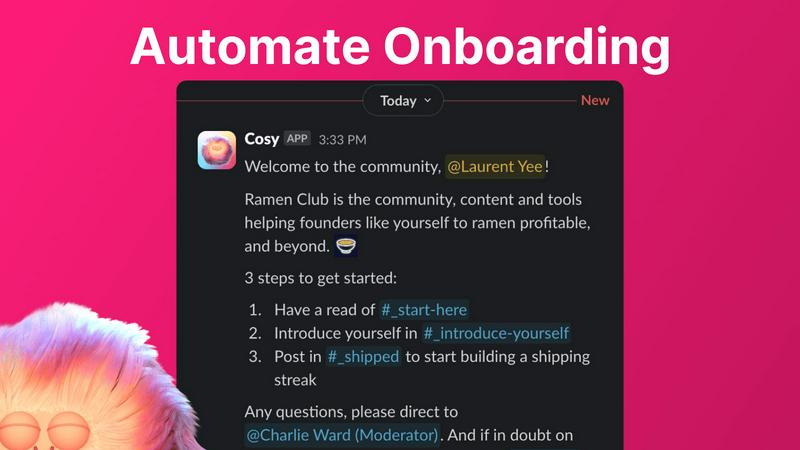
Cosy automates Slack onboarding and member intros to boost engagement and save hours weekly.
VisitPublished on:
November 13, 2025
Pricing:
About Cosy
Cosy is an enterprise-grade Slack-native platform engineered to automate and elevate community management, delivering measurable ROI through significant time savings and enhanced member engagement. Designed for community managers, organizations, and businesses, Cosy transforms Slack from a simple communication tool into a thriving, self-sustaining community hub. Its core value proposition lies in automating the most labor-intensive administrative tasks—such as member onboarding, introductions, and content moderation—freeing leaders to focus on strategic growth and high-value interactions. By providing a searchable member directory and intelligent content surfacing, Cosy directly fosters deeper connections and ensures valuable contributions gain visibility. The platform's built-in moderation tools proactively maintain a safe and professional environment. Ultimately, Cosy enables the cultivation of vibrant, engaged communities directly within Slack, driving member satisfaction and retention while systematically reducing weekly manual effort by hours.
Features of Cosy
Automated Onboarding Sequences
Cosy automates up to 10 distinct welcome DM sequences for new members, triggered immediately upon joining or on a configurable delay. This feature allows for fully customizable messages, including personalization with the member's name, links, and emojis. Sequences can be sent from a community leader, a team member, or the Cosy bot, ensuring consistent, 24/7 onboarding that saves hours of manual outreach and follow-up. This guarantees no new member is overlooked, even outside business hours, setting the tone for immediate engagement.
Intelligent Member Introductions
This feature grows community engagement by automatically introducing opted-in members to each other via direct message on a customizable cadence (every 1-4 weeks). Introductions are made in a 3-person DM including both members and the Cosy bot, with a customizable template to kickstart conversation. The system intelligently avoids recent matches to maximize serendipitous connections, fostering a network effect and deepening relationships across the community without manual intervention from managers.
Slack-Native Member Directory
Cosy creates a fully searchable member directory that operates entirely within Slack, eliminating the need for external platforms. Community leaders can define up to 10 custom profile fields (text, single-select, or multi-choice) and prompt members to fill them via automated DMs. Members can then use a slash command (/member-directory) to search for peers by keyword or filter by completed profiles, facilitating easy connections based on shared interests, skills, or expertise.
Content Engagement & Moderation Tools
Cosy provides powerful slash commands to surface high-value content and maintain community health. Leaders can instantly retrieve the top 10 most engaged posts in a specific channel or across all public channels. Additionally, the tool can flag unreplied messages to ensure no query goes unanswered. Built-in moderation automatically detects and flags spam and abusive language, creating a safer environment and protecting the community's professional integrity with minimal manual oversight.
Use Cases of Cosy
Scaling Enterprise Customer Communities
For SaaS companies and B2B organizations hosting customer communities on Slack, Cosy automates the onboarding of hundreds of new users, ensuring each receives consistent product information and support resources. The member directory helps customers find peers with similar use cases, fostering peer-to-peer support and reducing the load on customer success teams, while content highlights ensure best practices and success stories are widely seen.
Managing Professional & Industry Networks
Association leaders and professional network managers use Cosy to facilitate meaningful connections among members. Automated introductions break the ice between professionals, driving networking value and engagement. The searchable directory allows members to find potential collaborators, mentors, or experts within their field, directly translating community membership into tangible professional opportunities.
Running Engaged Internal Employee Communities
Large organizations utilize Cosy to enhance their internal Slack workspaces, automating welcome sequences for new hires and connecting employees across different departments to break down silos. Surfacing top content from all-hands channels or project updates ensures important information gains visibility, fostering a more connected and informed company culture.
Moderating High-Volume Support & Discussion Groups
For communities with high message volume, Cosy's moderation tools are critical for maintaining quality. Automatically flagging spam protects the channel's focus, while the ability to quickly surface unreplied messages allows community managers or dedicated volunteers to ensure every member's question is addressed, improving overall satisfaction and trust in the community as a resource.
Frequently Asked Questions
How does Cosy handle data privacy and security?
Cosy is a Slack-native application that operates within Slack's robust security and compliance framework. It only accesses data and performs actions based on the permissions granted during installation. User profile data for the directory is stored securely and is only accessible to members within the specific Slack workspace. Cosy is designed to be compliant with standard enterprise data protection requirements.
Can I customize the onboarding messages and introduction templates?
Yes, Cosy offers extensive customization. Onboarding sequences can include fully personalized text, emojis, and links, and can be scheduled with precise time delays. Introduction messages are also based on a customizable template that you can edit to match your community's tone and objectives, ensuring all automated communication aligns with your brand voice.
What happens if a member opts out of introductions?
Community members have full control and can opt out of automated introductions at any time. The Cosy bot manages these preferences seamlessly. When configuring introductions, the system will only match members who have actively opted in, respecting user choice and ensuring a positive experience.
Is there a limit to the number of members Cosy can support?
Cosy offers a free plan for communities with up to 250 members. For larger communities, paid plans offer unlimited members. All paid plans begin with a full 30-day trial of the unlimited members feature, allowing you to test the platform at scale before any commitment.
Pricing of Cosy
Cosy employs a tiered pricing model designed to scale with your community. A free plan is available for communities with up to 250 members, providing access to core features. For larger organizations requiring unlimited members and full functionality, paid subscription plans are available. All paid plans include a 30-day trial period for the unlimited member capability, allowing for comprehensive evaluation. Specific pricing tiers and rates are available directly on the Cosy website or through the Slack app directory listing.
Explore more in this category:
Similar to Cosy

Free collection of online developer utilities, code formatters, and digital converters designed to streamline your daily workflow.


The #1 Native Form Builder Plugin for Framer - No Code, No Embeds, No External Platforms.

A free launch checklist for SaaS, apps, AI tools and more. Every step says why it matters and when you can skip it.

Practical, independent guides to home repairs, maintenance, costs, troubleshooting, and everyday fixes.

A GEO SEO platform for creating and publishing multilingual content optimized for AI search visibility.

Highlight faster. Study in flow with custom shortcuts and a workflow built around you. Print smarter, or turn any page into a tiled poster.
