
Opal
Opal is a visual workspace that consolidates all your projects and notes, enabling instant access and seamless organization for maximum productivity.
Visit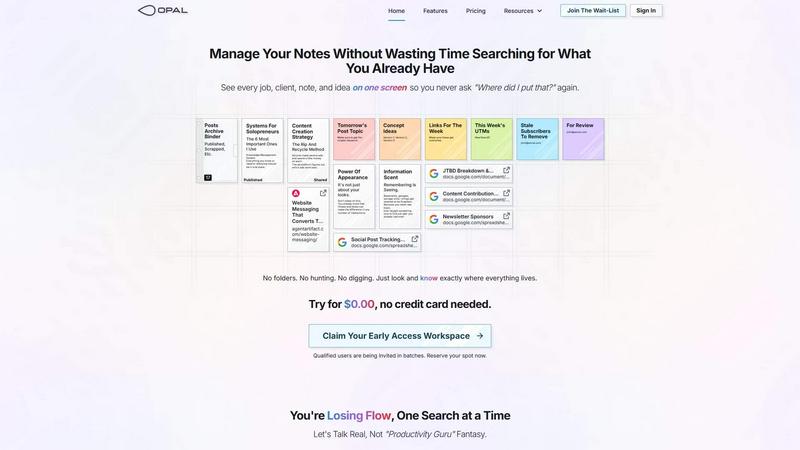
About Opal
Opal is an innovative visual knowledge and project management workspace tailored for individuals who naturally think spatially. It addresses the chronic issue of losing vital notes and ideas in conventional, linear organizational tools. Opal provides users with an expansive digital canvas where they can effortlessly drag and drop notes, documents, files, and links. This visual organization mimics a physical workspace, allowing users to remember not just the content but also the location of their information. Designed for solopreneurs, consultants, agency owners, and writers, Opal enhances productivity by keeping all active projects, client details, and creative ideas visible and easily accessible. With Opal, you can forget about wasting time searching through nested folders and focus on doing your best work, improving your workflow and efficiency.
Features of Opal
Visual Workspace
Opal offers a gigantic digital canvas that allows you to lay out all your active jobs, clients, tasks, and notes in a manner that is visually intuitive. You can group, stack, and arrange your information freely, which helps your brain form a mental map of where everything is located.
Drag-and-Drop Functionality
The platform's drag-and-drop feature allows users to organize their notes and documents with ease. Whether grouping related tasks or stacking ideas, this functionality simplifies the management of complex information, enabling quick adjustments to your workspace.
Instant Retrieval of Information
With Opal, you can see every job, client, note, and idea on one screen, eliminating the frustration of searching for misplaced information. This instant visibility means you can retrieve what you need without wasting time, enhancing your productivity.
Spatial Memory Approach
Opal's unique design leverages spatial memory, allowing users to remember where their information is, rather than just what it is. This approach significantly reduces the cognitive load associated with information retrieval, making it easier to maintain focus and efficiency.
Use Cases of Opal
Project Management
Opal is ideal for managing multiple projects simultaneously. Users can visually organize project components, making it easy to see progress, deadlines, and tasks at a glance, leading to improved time management and productivity.
Client Management
For consultants and agency owners, Opal provides a comprehensive view of client details, interactions, and project statuses. This clarity helps in maintaining strong client relationships and ensures that no important information is overlooked.
Content Creation
Writers and content creators can use Opal to brainstorm and organize their ideas visually. With the ability to lay out concepts and drafts side by side, users can refine their content without losing track of their creative thoughts.
Knowledge Management
Opal serves as a centralized hub for all your knowledge and reference materials. Whether you are compiling research or tracking insights, everything is easily accessible on one screen, streamlining the knowledge management process.
Frequently Asked Questions
How does Opal help improve productivity?
Opal enhances productivity by providing a visual workspace that allows for easy organization and instant retrieval of information, reducing the time spent searching for notes and files.
Is Opal suitable for team collaboration?
Yes, Opal is designed for both individuals and teams. It allows multiple users to access and organize information together, facilitating collaborative project management and communication.
Can I customize my workspace in Opal?
Absolutely. Opal offers flexibility in how you organize your digital workspace, allowing you to customize layouts, groupings, and arrangements to suit your workflow preferences.
How secure is my data in Opal?
Opal takes data security seriously, implementing robust security measures to ensure that your information is protected while you manage your projects and ideas within the workspace.
Similar to Opal

Apps and files on an infinite canvas where people and AI agents work together.

Jev turns text or JSON into Choice, Score and Noul answers with probabilities. Build decision flows and call the API.

Panzoe is an all-in-one AI platform for personal productivity, business automation, AI assistants, content creation, and custom AI solutions.

A tray helper for every AI coding tool: one searchable library of past sessions, waiting alerts and usage across 9 providers.

AI Email Filter sorts incoming mail into folders using plain-language prompts you write. Works with any IMAP mailbox; bring your own LLM if you want.

Free collection of online developer utilities, code formatters, and digital converters designed to streamline your daily workflow.

The #1 Native Form Builder Plugin for Framer - No Code, No Embeds, No External Platforms.

A free launch checklist for SaaS, apps, AI tools and more. Every step says why it matters and when you can skip it.